Search for a DJ streaming setup and you land in an arms race. Multiple cameras, a hardware switcher, a capture card, an XLR microphone, two lights, a stream deck, and a partridge in a rack case. None of that is wrong — but almost none of it is what makes a stranger stop scrolling and stay on your set.
After a few hundred DJ streams, the pattern is boringly consistent. The streams that look professional are not the ones with the most gear. They are the ones where the audio is clean, the picture is lit, and nothing drops. That is a much shorter shopping list than the internet suggests, and it costs a lot less than the gear-list videos imply.
This guide separates the three things that genuinely change how your stream looks and sounds from the kit that mostly changes how your desk looks. Prices are rough street prices in euros, because they move.
The Whole Rig Is Three Links
Strip away the branding and every DJ stream is three links in a chain. Sound has to leave your mixer or controller cleanly. Picture has to leave a camera with enough light on it. Both have to reach an encoder — usually OBS — that stays inside your upload bandwidth.
Your budget should follow the damage. A weak link anywhere in that chain is visible to the viewer instantly: muddy audio, a dim orange face, or a stream that stutters every time the bitrate spikes. A fourth camera on top of a broken chain changes nothing.
Audio First — The Only Upgrade Everyone Notices
Viewers forgive a grainy picture. They leave when it sounds wrong. Audio is also where most budget rigs quietly fail, because the default path — controller into laptop, laptop headphone jack into nothing — works just well enough to hide the problem.
Get the signal out properly
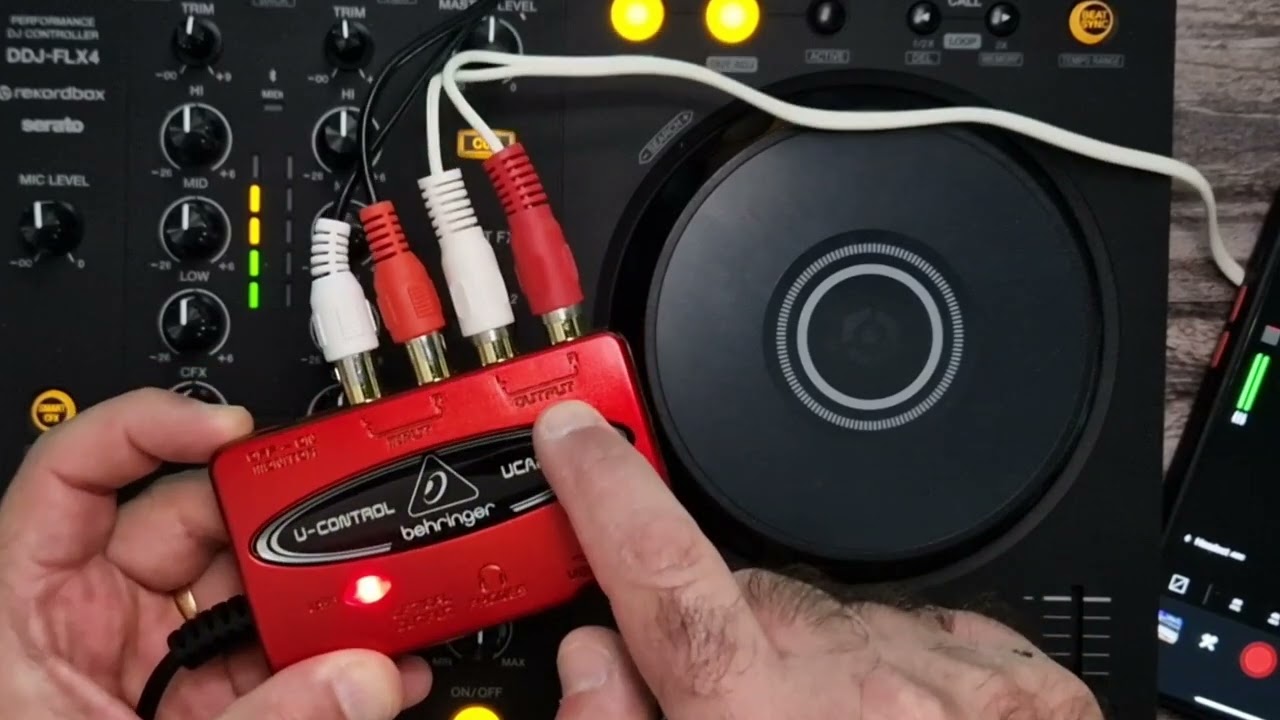
You want the master or record output of your mixer, or the controller's own USB audio interface, not the headphone jack. A headphone output is amplified and impedance-matched for cans; feeding it into a line input invites clipping and noise. If your controller has a built-in sound card — most DDJ, Kontrol and Prime units do — OBS can take it directly as an audio input and you need no interface at all.
If your mixer only has RCA record out, a small USB interface fixes it for the price of a pizza. The Behringer UCA222 gets the job done at around €25 and is the classic first purchase for a reason; a Focusrite Scarlett Solo at around €110 buys you a proper preamp and a second input for a microphone later. Either way, the job is the same: analogue out of the mixer, digital into the computer, no adapters dangling.
Levels that do not clip
Keep peaks around −6 dBFS and leave the master where it is for the whole set. A stream that touches 0 dBFS does not sound louder, it sounds broken — and once the encoder has clipped, the platform cannot undo it. If you are checking loudness rather than peaks, aim for roughly −14 LUFS integrated, the sort of level YouTube normalises toward. Twitch does not normalise, so a hot mix there just sounds harsh rather than loud.
The hum that ruins the mix
A low buzz at mains frequency — 50 Hz in Europe — is a ground loop, not a faulty cable. It appears when two devices are earthed through different paths, typically laptop charger and mixer on separate outlets. The fixes in order of cheapness: run everything from one power strip, use a ground-loop isolator or DI box on the audio line, and lift the laptop's charger from the mains while you stream on battery. Chasing it with a new cable rarely works.
Monitor on headphones, not speakers. An open microphone plus open monitors is a feedback loop waiting for the one moment you talk. For the full routing picture, our guide to DJ stream audio routing goes deeper into monitoring, ducking and microphone placement.
Video Second — Light Before Camera
Here is the most useful sentence in this article: a cheap camera in good light beats an expensive camera in a dark room. Every camera sensor is fighting for photons, and a club-lit booth is a hard scene. A single LED panel at 45 degrees to your face, diffused, at around €60, will improve your picture more than doubling your camera budget.
Your phone is already a better camera than most webcams — bigger sensor, better lens, actual dynamic range. It can join OBS over USB with an app like Camo or Iriun, or over the network with an NDI camera app, which keeps the phone wireless. Mount it at eye level, lock exposure and white balance so it stops hunting every time you move, and shoot 1080p.
A dedicated camera is worth it when you want background blur from a fast lens, or a second angle. If that camera only has HDMI out, you need a capture card — unless it speaks NDI, in which case the network carries it and the capture card stays in the drawer. That trade-off is the whole argument in our NDI guide for DJ streams.
Two more free wins: frame yourself deliberately (head and hands both visible, camera at eye level, not a laptop webcam looking up your nose), and kill the clutter behind you. A dark wall and one light source reads as intentional. A laundry rack reads as a bedroom.
The Computer and the Pipe
The computer matters less than people think, as long as it has a hardware encoder. Modern NVIDIA, AMD and Apple chips encode H.264 in dedicated silicon, which frees the CPU for your DJ software. Software x264 still gives slightly better quality per bit, but if your CPU is also running stems, keylock and eight decks, hardware encoding is the difference between a stable stream and a slideshow.
Then the arithmetic nobody does before going live. A 1080p60 stream at 6,000 kbps of video plus 320 kbps of audio needs about 6.3 Mbps of upload, steady, while you are playing. Add headroom for the rest of the house — phones, TVs, someone's backup — and you want at least 12–15 Mbps of reliable upload, measured at the same time of night as your show. If you have less, drop to 720p60 at 4,500 kbps. A clean 720p looks better than a 1080p stream that collapses into blocks every ninety seconds.
What You Do Not Need to Buy
- A hardware switcher. An ATEM Mini is superb kit, and it is the wrong first purchase for a two-camera DJ stream. OBS switches scenes for free — see how to run two cameras without an ATEM.
- A capture card, if your second camera is a phone or speaks NDI.
- 4K anything. Platforms transcode to 1080p and below; viewers on phones see 720p. Spending on 4K ingest is spending on bits nobody receives.
- An XLR microphone, if you never speak. If you do speak, a €60 dynamic mic on a boom beats a €300 condenser on a desk picking up your monitors.
- A stream deck until you have more scenes than fingers.
Four Tiers, Honestly Priced
Tier 0 — €0 to €30
Laptop, controller with built-in USB audio, phone as camera over USB or NDI, free OBS, one desk lamp aimed at your face. If your mixer has no digital out, add the €25 USB interface. This tier already produces a stream people watch, and it is the tier most DJs should start on.
Tier 1 — around €150
Proper USB interface, one diffused LED panel, a phone mount at eye level. This is the best value-for-money jump in the entire list: cleaner audio, a face that is not lit by a monitor, and a camera that does not move.
Tier 2 — around €500
A used mirrorless body with a fast prime, plus a capture card if it has no NDI, plus a second light for separation. This is where a stream starts looking like a production rather than a webcam call.
Tier 3 — €1,200 and up
Second camera, a hardware switcher or a second NDI source, programmed overlays showing what is playing, and acoustic treatment for the room you stream from. Diminishing returns start early here — and it is the only tier where a switcher makes sense.
The upgrade order that viewers actually notice
- Clean audio path — the single biggest jump.
- Light on your face — the second biggest.
- Framing and background — free, and usually skipped.
- Camera quality — a real upgrade, but a distant fourth.
- Second camera, switcher, overlays — polish on top of a working rig.
Spend in that order and you will never own a piece of gear you cannot hear or see on stream. The last thing to fix is rarely a purchase at all: run a pre-flight check before every set, so the rig you already own actually works when the first viewer arrives.
Sources & Further Reading
- OBS Studio — Official Documentation — encoder, audio and output settings reference, including hardware encoder options
- Twitch — Broadcasting Guidelines — platform bitrate, resolution and encoder guidance for live streams
- Rane — Sound System Interconnection (Note 110) — the standard reference on balanced and unbalanced wiring and ground loops
- Blackmagic ATEM Mini — Tech Specs — what a hardware switcher actually does, and its input and output limits
- Mixxx — User Manual — open-source DJ software, recording and broadcasting configuration
Ready to put this into practice? Grooveline is a free platform for DJs to broadcast — create your profile, book a slot, and go live.